
Does that used MicroScribe still work, and does it still measure? Those are two different questions. Here is how to answer the first one yourself, and where to go for the second.
Last week I asked what a MicroScribe is good for. This week, the question every buyer of a used arm asks next: does it still work?
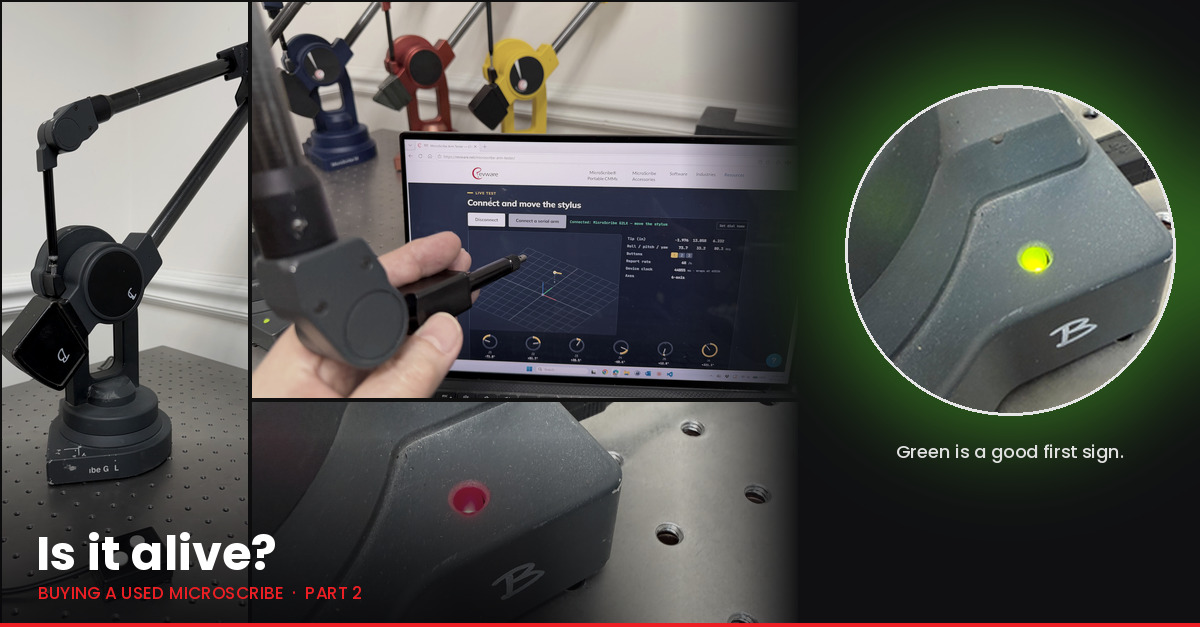
Start with the light. Every MicroScribe has a status LED, and it tells you a lot.
- Power it up. No light at all usually means a damaged main board.
- The LED should turn green, either right away or after you press the Home button. If it stays red, something is wrong in the main board, a joint encoder, or a wiring harness.
- On a G2-series arm with Windows 10 or 11, a slow-flashing LED usually just means no software is talking to it, so Windows has cut power to the USB port. Open MUS or the Arm Tester and the light turns steady red; press Home and it goes green.
Power matters too. The 3D and M series arms need their power supply just to be tested. Every MicroScribe runs on 5 volts except the M series, which uses 9. If a seller tells you the supply is 12 volts, someone substituted a speaker power supply, and the arm has probably been damaged by it. A replacement 5-volt supply is easy to find; the M series needs ours. Both are in our web store: the 5-volt power supply and the M series power supply.
Then let it talk. The MicroScribe Arm Tester on our website checks any arm, serial or USB, in a browser in about thirty seconds. Sellers can run it too. Before you pay, ask for a screenshot or a short video of the tester following the arm.
Use Chrome or Edge on a desktop or laptop. Other browsers cannot open USB devices or serial ports, and phones and tablets cannot either. Tested on Windows and Mac; Linux should work as well.
Close MUS and any other program that uses the arm.
Leave the arm resting in its home position until the page says it is connected.
Serial arms need a serial port or a serial-to-USB adapter. Direct the page to the COM port the adapter creates.
Open the MicroScribe Arm Tester
Here is the catch: alive is not the same as accurate. An arm can power up, turn green, report every joint, and still measure badly. A worn bearing, damage in shipping, or the wrong probe will not show up as a red light.
If you have the software, you can get a rough sense yourself:
- Copies of MUS from the last fifteen years include the SPAT (Single Point Articulation Test) template for checking an arm’s consistency.
- In Rhino, or any program with a MicroScribe interface, rest the probe tip in one spot and move the arm through different poses. The point should not wander.
- Measure an object whose size you know.
The next MUS release will build test applications in.
For a definitive answer, we evaluate arms. We test the arm, tell you what we find, and recommend a calibration, repair, or upgrade path. If you go ahead with the work, the evaluation fee applies to it. You can request an evaluation from our support page; here is how our services compare.
Next week: what am I looking at? How to tell which MicroScribe you have, even when the label is long gone.
About Revware
Revware provides high, quality, simple to use, innovative, cost-effective modeling solutions to solve your design, metrology, and engineering problems.