
MicroScribe® SDK 4.0The MicroScribe API, rebuilt for the next thirty years.
One SDK connects your Windows application to every MicroScribe ever shipped — from the first serial arms to today's high-rate USB models — and now draws the arm live, measures through a turntable, and hands you the kinematics your robot-teaching or simulation work needs.
The SDK is licensed, not sold, under the MicroScribe SDK License Agreement. You will be asked to accept it when you extract the package.
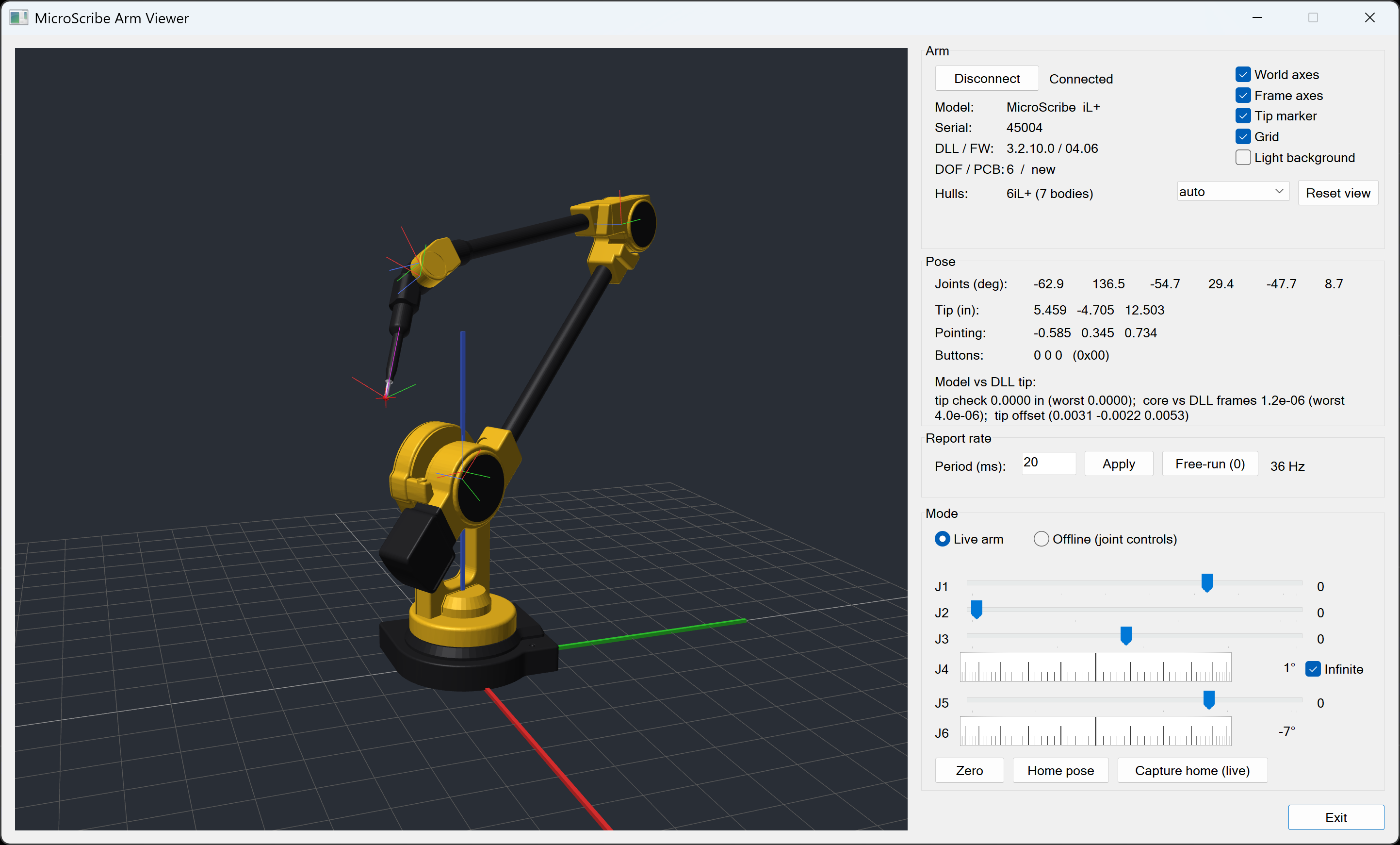
- Joints (deg)
- -62.9 136.5 -54.7 29.4 -47.7 8.7
- Tip (in)
- 5.459 -4.705 12.503
- Model vs DLL
- tip check 0.0000 in · core vs DLL frames 1.2e-06
Everything that changed since 3.x — and why it matters
Modernized ArmDLL
Win32 and x64 builds from a single VS2022 codebase with a static runtime: no Visual C++ redistributable, no installer, drop the DLL beside your executable. The ABI — the application binary interface, meaning the DLL’s exported functions, calling convention, and data layouts — is append-only: applications built against any ArmDll 3.x import library keep working unchanged.
Rate control that doesn't block
ArmSetReportPeriod changes the report period in microseconds instead of the multi-second stall of the old update call. Meter from 1 to 254 ms, or open the floodgate with period 0 and stream at the arm's full hardware rate on current USB arms. A 1 ms hardware timestamp rides on every report, so sample timing is the device's clock, not your host's.
The turntable service
Zero, calibrate, align, enable. The DLL computes eccentricity and alignment, persists them per serial number, and applies table-frame compensation to every report. Roughly three thousandths through a full rotation on the reference rig. TurntableDemo walks the entire recipe.
Kinematics as a first-class API
ArmGetDHParameters returns the exact DH set and calibrated tip offset the DLL uses; ArmGetLinkFrames returns the six cumulative link frames of the latest report. Draw the arm, feed a simulator, or teach a robot — bit-identical to the DLL's own pose.
Arm visualization package + ArmViewer
Eleven CAD hulls of the i+ series arm (STEP and STL, each authored in its own link frame), a JSON manifest, and the MsArmModel::core library that turns a live report into one world transform per body. The ArmViewer sample shows the connected arm moving on screen in real time.
Probe management as a standard
A UI-agnostic core library for sampling, button filtering, distinct-sample detection, tip calibration and table-compensation guards, plus a written specification and a minimal reference UI. Adopt it as-is instead of re-implementing it.
Build MUS Add-Ins
The kit the MUS 8.0 Add-Ins are built with: the Add-In ABI header and the MusAddinSdk utility library (results grid, report, panel image, metrology math). Start from PointLogger, a complete example Add-In, and run it without MUS or an arm in AddinCheck, a mock host with a simulated arm.
Also new: observable homing, user markers and per-unit capability tags with graceful fallback on older firmware; an offline HTML help site replacing the CHM; refreshed “Defining Custom Tips”; and a set of quiet fixes to tip calibration and compensation streaming.
See the arm move. Then make something move with it.
Integrators kept asking for CAD of the arm, mostly for robot-teaching work: a live on-screen MicroScribe moving in sync with the physical one, as the first step toward driving a robot from it. SDK 4.0 ships the answer. ArmViewer connects, reads the arm's own DH parameters, selects the matching hull set (5- or 6-axis, short or long tubes), and renders it in Direct3D 11 at the report rate you choose. A live “model vs DLL tip” readout proves the drawn arm and the measured tip agree to rounding noise.
Switch to Offline mode and the same hulls follow slider and jog-wheel controls, with joint ranges the viewer learned from your arm — a kinematics teaching tool that needs no hardware in the classroom after connecting to an arm one time.
Everything ArmViewer does goes through MsArmModel::core, and that library is the part meant to be lifted into your own application. The per-frame recipe is four calls.
- Live and Offline modes; learned joint ranges and captured home pose per serial number
- STEP bodies import into any CAD system; STL bodies load with no CAD kernel
- Compatible with i, i+, iL, iL+, G and 3D series geometry
ArmModelCheckconsole sample: the same proof without graphics, plus a no-hardware self-test
msarm::ArmSample s = arm.sample(); // joint angles, tip, pointing axis, buttons
msarm::Mat4 F[7];
arm.linkFrames(F); // the DLL's link frames for that report
model.pose(F);       // world = F[link] * bind, per body
for (const msarm::PlacedBody& b : model.bodies())
draw(b.mesh, b.world, b.body->color);Start inside MUS.
Most MicroScribe projects begin the same way: collect raw data with MUS, usually into a spreadsheet, and feed it into the process being developed. MUS 8.0 Add-Ins let you take the next step without leaving MUS. Device management is done for you, so your code starts at the part that is yours.
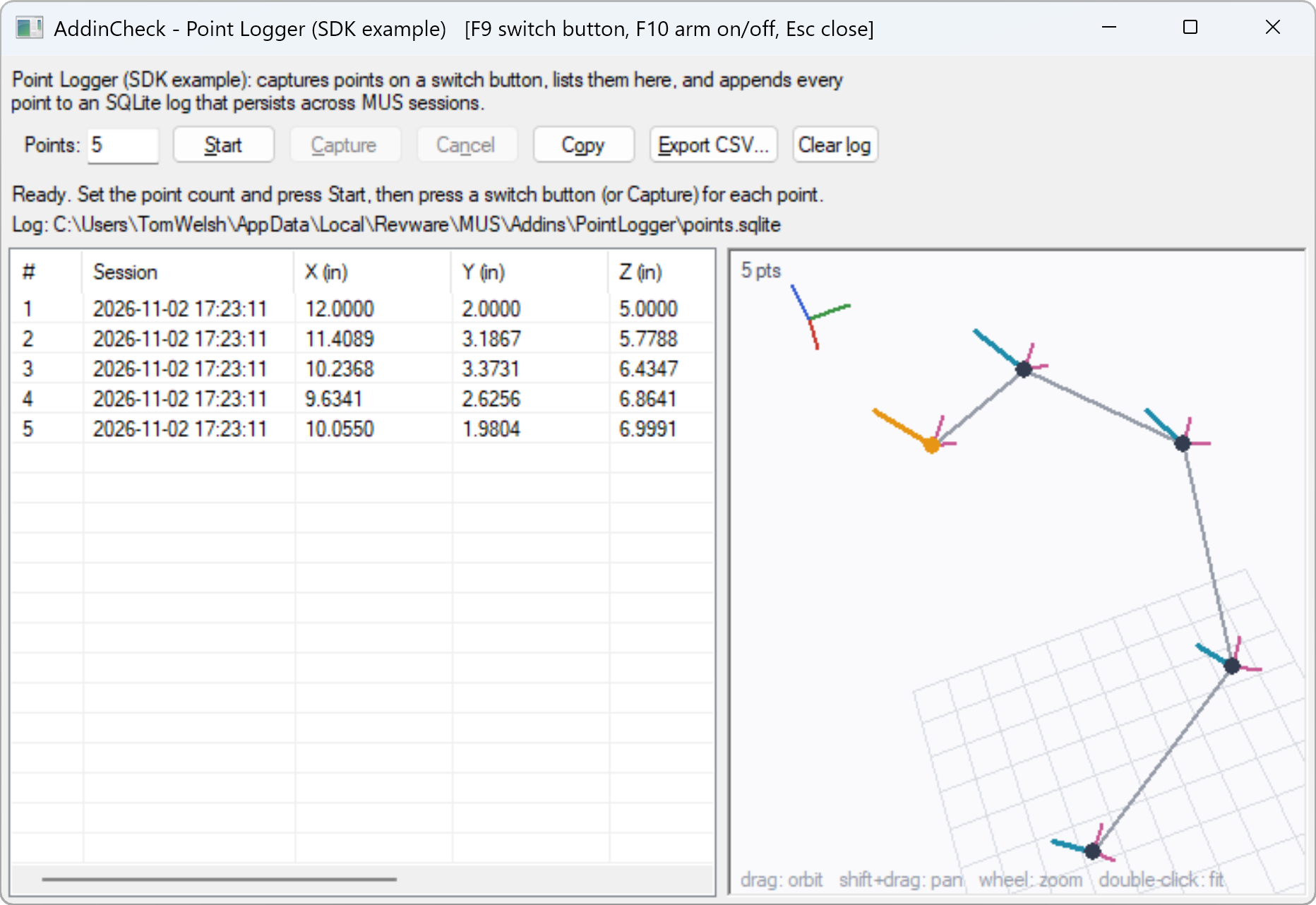
PointLogger is the SDK's example Add-In, in one source file plus a 3D view. It captures points on a switch button, lists them in the results grid, exports CSV, keeps every point in a SQLite database so the log outlives the MUS session, and draws the points in a 3D view with the stylus orientation of each one. SQLite is the point of the example: it shows how a third-party library is linked into an Add-In.
- One DLL, one export (
MusCreateAddin); static runtime, SQLite compiled in - Built by the SDK's CMake with the same rules MUS uses for its own Add-Ins
AddinCheckhosts any Add-In over a simulated arm;--checkruns unattended as a CTest- Copy the DLL into the MUS Addins folder to run it in MUS 8.0
Plug in a MicroScribe and watch it move — no download.
The MicroScribe Arm Tester reads an arm directly in Chrome or Edge — USB, or serial through a COM port or USB-serial adapter — and shows the stylus tip, its pointing direction, the six joint encoders and the buttons live — computed by the same browser kinematics core Revware is preparing for a future SDK release. It's a quick way to confirm an arm is talking before you buy anything, and a small taste of what the SDK gives your own application.
USB and serial MicroScribe models in Chromium-based browsers (Chrome, Edge); serial arms connect through a COM port or a USB-serial adapter. Nothing is uploaded; the connection is local to your machine.- Live stylus view and six joint dials
- Button test and device readout
- Copyable diagnostic for support
Built for the people who build on MicroScribe
Software integrators & ISVs
Connect your Windows product to every MicroScribe with one DLL. Start from a thirty-line “hello, arm,” adopt the probe-management standard, ship with no runtime dependencies.
Robotics & engineering educators
A real 5- or 6-axis arm that reports its own DH parameters and link frames, with CAD hulls to render. Forward kinematics, frame conventions and robot-teaching workflows, taught on hardware students can hold.
Researchers & labs
Timestamped high-rate capture, custom tip profiles, turntable-frame measurement, and full source for every sample so a custom capture tool is an afternoon, not a project.
OEM & hardware partners
Embed the arm in your system. Capability-gated behavior instead of firmware-version tables, redistribution-ready binaries, and arm models licensed for integration in your product.
Already in the field. A European OEM has completed an integration on the 4.0 feature set and has already shown it publicly.
From zero to live data in thirty lines
Straight from the shipped samples. A plain __stdcall Win32 DLL with a C header — reachable from any language with a foreign function interface.
Windowless polling — no message pump — from the MSConsol sample.
#include <armdll32.h>

// Start the DLL with no window: we poll the cached record, no message pump.
if (ArmStart(NULL) != ARM_SUCCESS) return 1;

// USB is checked first; (0,0) then scans serial ports if nothing is found.
if (ArmConnect(0, 0) != ARM_SUCCESS) { ArmEnd(); return 1; }

char model[MAX_PATH]; int dof = 0;
ArmGetModelName(model, MAX_PATH);   // "i+", "iL+", "G2", ...
ArmGetNumDOF(&dof);                 // 5 or 6 -- never infer it from encoders

ArmSetLengthUnits(ARM_INCHES);
ArmSetAngleUnits(ARM_DEGREES);
ArmSetUpdateEx(ARM_FULL, 100);      // position + orientation, 100 ms to start

length_3D tip; angle_3D aim; DWORD buttons;
ArmGetTipPosition(&tip);            // x, y, z
ArmGetTipOrientationUnitVector(&aim); // where the stylus points
ArmGetButtonsState(&buttons);       // a BITMASK: 0x01, 0x02, 0x04 ...

ArmDisconnect();
ArmEnd();
Change the report period live, without blocking the read thread, and read the device's own clock.
// Change the report period live, without blocking the read thread.
ArmSetReportPeriod(20);             // 20 ms metered (~50 Hz while moving)
ArmSetReportPeriod(0);              // 0 = free-run at the arm's full rate

// Every report carries the device's own 1 ms clock (new-PCB / USB arms).
long ts = 0;
ArmGetTimestamp(&ts);               // wraps at 65536; 0 on legacy serial arms
The four-call per-frame recipe from MsArmModel::core — the same code ArmViewer runs.
msarm::ArmSample s = arm.sample(); // joint angles, tip, pointing axis, buttons
msarm::Mat4 F[7];
arm.linkFrames(F); // the DLL's link frames for that report
model.pose(F);       // world = F[link] * bind, per body
for (const msarm::PlacedBody& b : model.bodies())
draw(b.mesh, b.world, b.body->color);What you get that 3.x never had
| SDK 3.x | SDK 4.0 | |
|---|---|---|
| ArmDLL | 3.2.x, older toolchain | 3.2.10.0, VS2022, static runtime, Win32 + x64 |
| API | 39 functions | 66 functions — 27 new, append-only ABI |
| Rate control | ArmSetUpdateEx (blocks) | ArmSetReportPeriod (non-blocking) + free-run |
| Timestamps | — | 1 ms hardware timestamp |
| Homing, markers, capabilities | not observable | observable, with legacy fallback |
| Turntable | app-side math from a Word doc | in-DLL service, persisted per serial |
| Kinematics | via deprecated arm_rec | ArmGetDHParameters / ArmGetLinkFrames |
| Arm CAD | by request | 11 STEP + STL hulls, manifest, MsArmModel::core |
| Samples | 3, older VS projects | 8 CMake samples incl. ArmViewer, PointLogger, TurntableDemo, Probe_Ref |
| MUS Add-Ins | not available | authoring kit, PointLogger example, AddinCheck mock host |
| Probe management | 2011 MFC sample | core library + written standard + reference UI |
| Help | CHM | offline HTML site, full reference for every export |
| Install | proprietary installer | portable self-extractor, no admin rights |
| Availability | free, by request | $249, instant download |
Simple, permissive licensing
One purchase, one developer license, and the right to ship what you build. Applications you create with SDK 4.0 may include the ArmDLL runtime and the arm models royalty-free, on as many end-user systems as you like. The binaries and models remain Revware property: distribute them unmodified and under their original names, display the notice "Portions copyright (c) 1992-2026 Revware, Inc., or its subsidiaries. All rights reserved." in your product, and you're done. The SDK is licensed, not sold, under the MicroScribe SDK License Agreement; you accept it once, when you extract the package.
- Royalty-free redistribution of the runtime with your application
- Arm models licensed for use inside your product
- No activation, no keys, no phone-home
Delivered as one download, the portable self-extractor MicroScribe_SDK_4.0.0_Setup.exe: it shows the license agreement, asks you to accept it, then extracts to a folder of your choice — no administrator rights, nothing installed. Windows 10 and 11.
Questions integrators ask first
Which arms does it support?
Every MicroScribe: current USB models (i+, iL+, MX, MLX and PLUS upgrades) and the legacy line (i, iL, G2, G2L, 3D, 3DL) over USB or serial, from either the 32-bit or the 64-bit DLL.
Which operating systems?
Windows 10 and 11. Earlier versions are untested.
Which languages?
The API is a standard __stdcall Win32 DLL with a C header, so it is reachable from any modern language through its foreign function interface — C#/.NET (P/Invoke), Python (ctypes), Java (JNA), Node, Rust, LabVIEW, MATLAB and more. The shipped samples are C/C++.
Do I need Visual Studio?
To build the samples, VS2022 (or the Build Tools) with CMake. To use the DLL in your own project, only your own toolchain.
Can I ship the DLL with my application?
Yes, royalty-free, unmodified and under its original name, with the Revware copyright notice in your product. See the license.
I have SDK 3.x. Is this an upgrade?
It's a new purchase. Code built against 3.x keeps working — the ABI is append-only — and 4.0 adds 27 functions, four new samples (six in all), the model package and new documentation. Revware plans to release new paid feature updates periodically; you buy the ones you want.
Is there an evaluation?
The full source of every sample and the complete help site are in the download, and the MicroScribe Arm Tester reads a USB arm in the browser with no purchase. Contact Revware if you need more before buying.
How is it delivered?
Immediately after checkout, as a download from your order page and confirmation email: the self-extractor MicroScribe_SDK_4.0.0_Setup.exe. It shows the license agreement, asks you to accept it, then extracts the SDK to a folder of your choice — no administrator rights, nothing installed, no registry or Start-menu entries. The file is not code-signed for 4.0, so Windows may show a SmartScreen prompt; click More info, then Run anyway, and check the SHA-256 shown at the bottom of this page if you want to verify the file first.
Where do I get help?
The offline help site covers every function; the Revware support portal and email are there for the rest.
Ready to build on MicroScribe?
The SDK is licensed, not sold, under the MicroScribe SDK License Agreement. You will be asked to accept it when you extract the package.
One file: MicroScribe_SDK_4.0.0_Setup.exe (10.2 MB). Windows may show a SmartScreen prompt because the file is not code-signed. Click More info, then Run anyway.
Your browser may also hold the download as “uncommon” or “may be dangerous” because the file is new and unsigned: in Chrome or Edge, open the downloads list and choose Keep (or Keep anyway) to release it, then verify the file with the SHA-256 below.
SHA-256: 3517899ccc6042feed8592c0d452d49b496261ba69df997940c408a172341ccc
Verify: certutil -hashfile MicroScribe_SDK_4.0.0_Setup.exe SHA256
MicroScribe® is a registered trademark of Revware, Inc. Portions copyright (c) 1992-2026 Revware, Inc., or its subsidiaries. All rights reserved.